数据库的json类型
json 与 jsonb
json 保持原始格式,
jsonb是解析输入后保存的二进制,在解析时会过滤掉不必要的空格和重复的健。
SELECT '{"name": "zhangsan", "age":      17, "sex":"m","age":17.5}'::json;
                            json
------------------------------------------------------------
 {"name": "zhangsan", "age":      17, "sex":"m","age":17.5}
SELECT '{"name": "zhangsan", "age":      17, "sex":"m","age":17.5}'::jsonb;
                     jsonb
-----------------------------------------------
 {"age": 17.5, "sex": "m", "name": "zhangsan"}
json 插入可能会更快些,jsonb的读取更快
操作符
json ,jsonb 操作符
| 操作符 | 右操作数类型 | 描述 | 示例 | 结果 |
|---|---|---|---|---|
| -> | int | 获取JSON数组元素(索引从0开始) | select '[{"a":"foo"},{"b":"bar"},{"c":"baz"}]'::json->2; | {"c":"baz"} |
| -> | text | 通过键获取值 | select '{"a": {"b":"foo"}}'::json->'a'; | {"b":"foo"} |
| ->> | int | 获取JSON数组元素为 text | select '[1,2,3]'::json->>2; | 3 |
| ->> | text | 通过键获取值为text | select '{"a":1,"b":2}'::json->>'b'; | 2 |
| #> | text[] | 在指定的路径获取JSON对象 | select '{"a": {"b":{"c": "foo"}}}'::json#>'{a,b}'; | {"c": "foo"} |
| #>> | text[] | 在指定的路径获取JSON对象为 text | select '{"a":[1,2,3],"b":[4,5,6]}'::json#>>'{a,2}'; | 3 |
jsonb 操作符
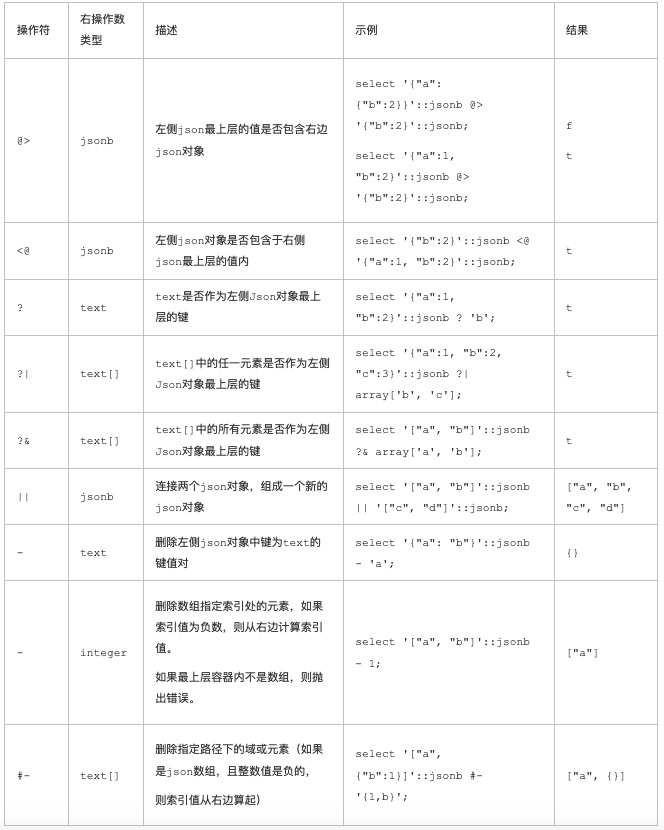
索引查询
单key 查询。btree 索引
postgres=# create table test (id int, js jsonb);
CREATE TABLE

postgres=# create index idx_test_2 on test using btree (((js->>'key1')::int));
CREATE INDEX

postgres=# explain select * from test where (js->>'key1')::int between 1 and 10 ;
                                              QUERY PLAN
------------------------------------------------------------------------------------------------------
 Index Scan using idx_test_2 on test  (cost=0.15..24.27 rows=6 width=36)
   Index Cond: ((((js ->> 'key1'::text))::integer >= 1) AND (((js ->> 'key1'::text))::integer <= 10))
(2 rows)
多KEY混合,使用btree_gin, 表达式索引
postgres=# create extension btree_gin;
CREATE EXTENSION

postgres=# create index idx_test_1 on test using gin (((js->>'key1')::int), ((js->>'key2')::int), ((js->>'key3')::int));
CREATE INDEX

postgres=# explain select * from test where (js->>'key1')::int between 1 and 10
postgres-# ;
                                                 QUERY PLAN
------------------------------------------------------------------------------------------------------------
 Bitmap Heap Scan on test  (cost=24.07..33.64 rows=6 width=36)
   Recheck Cond: ((((js ->> 'key1'::text))::integer >= 1) AND (((js ->> 'key1'::text))::integer <= 10))
   ->  Bitmap Index Scan on idx_test_1  (cost=0.00..24.06 rows=6 width=0)
         Index Cond: ((((js ->> 'key1'::text))::integer >= 1) AND (((js ->> 'key1'::text))::integer <= 10))
(4 rows)

postgres=# explain select * from test where (js->>'key1')::int between 1 and 10  or (js->>'key2')::int between 1 and 15;
                                                                                             QUERY PLAN
----------------------------------------------------------------------------------------------------------------------------------------------------------------------------------------------------
 Bitmap Heap Scan on test  (cost=48.13..59.32 rows=13 width=36)
   Recheck Cond: (((((js ->> 'key1'::text))::integer >= 1) AND (((js ->> 'key1'::text))::integer <= 10)) OR ((((js ->> 'key2'::text))::integer >= 1) AND (((js ->> 'key2'::text))::integer <= 15)))
   ->  BitmapOr  (cost=48.13..48.13 rows=13 width=0)
         ->  Bitmap Index Scan on idx_test_1  (cost=0.00..24.06 rows=6 width=0)
               Index Cond: ((((js ->> 'key1'::text))::integer >= 1) AND (((js ->> 'key1'::text))::integer <= 10))
         ->  Bitmap Index Scan on idx_test_1  (cost=0.00..24.06 rows=6 width=0)
               Index Cond: ((((js ->> 'key2'::text))::integer >= 1) AND (((js ->> 'key2'::text))::integer <= 15))
(7 rows)

postgres=# explain select * from test where (js->>'key1')::int between 1 and 10  and (js->>'key2')::int between 1 and 15;
                                                                                             QUERY PLAN
-----------------------------------------------------------------------------------------------------------------------------------------------------------------------------------------------------
 Bitmap Heap Scan on test  (cost=40.00..44.05 rows=1 width=36)
   Recheck Cond: ((((js ->> 'key1'::text))::integer >= 1) AND (((js ->> 'key1'::text))::integer <= 10) AND (((js ->> 'key2'::text))::integer >= 1) AND (((js ->> 'key2'::text))::integer <= 15))
   ->  Bitmap Index Scan on idx_test_1  (cost=0.00..40.00 rows=1 width=0)
         Index Cond: ((((js ->> 'key1'::text))::integer >= 1) AND (((js ->> 'key1'::text))::integer <= 10) AND (((js ->> 'key2'::text))::integer >= 1) AND (((js ->> 'key2'::text))::integer <= 15))
(4 rows)
gin 索引的支持
The default GIN operator class for jsonb supports queries with top-level key-exists operators ?, ?& and ?| operators and path/value-exists operator @>.

The non-default GIN operator class jsonb_path_ops supports indexing the @> operator only.
支持 @> 操作符的索引如下(jsonb_path_ops只支持@>操作符,索引的体积要小些但是效率高)
create table tbl(id int, js jsonb);

create index idx_tbl_1 on tbl using gin (js jsonb_path_ops);
支持除范围查询以外的所有查询的索引如下
create table tbl(id int, js jsonb);

postgres=# create index idx_tbl_1 on tbl using gin (js);  -- 使用默认ops即可
JSON KEY VALUE值范围查询加速
把范围查询的类型提取出来,创建btree表达式索引,如果有任意组合的范围查询,使用gin或rum表达式索引。
create extension btree_gin;
create index idx1 on tbl using gin( ((js->>'k1')::float8), ((js->>'k2')::numeric), ... ((js->>'kn')::float8) );
create extension rum;
create index idx1 on tbl using rum( ((js->>'k1')::float8), ((js->>'k2')::numeric), ... ((js->>'kn')::float8) );
模糊匹配索引
https://pgxn.org/dist/parray_gin/1.3.3/
结合了pg_trgm, 将数组或JSON中的value打散成token后进行索引构建. 实现数组或JSON元素级别的模糊匹配